What Is Nissan Connect?
Your Complete Guide to Staying Connected on the Road
If you’ve recently picked up a new Nissan — or you’re thinking about it — there’s a good chance you’ve heard the term Nissan Connect thrown around but wondered what it actually means for your daily drive. At Gordie Boucher Nissan in Greenfield, WI, it’s one of the most common questions that comes up in conversations with customers, and for good reason: it’s genuinely useful technology. So what does it do, and is it worth paying attention to? Let’s break it all down.
Key Takeaways
- ➔Nissan Connect is Nissan’s connected services platform that links your vehicle to your smartphone and the internet.
- ➔It offers remote start, lock/unlock, vehicle health reports, navigation, and more — all from your phone.
- ➔There are multiple Nissan Connect packages available, so you can choose the level of connectivity that fits your lifestyle.
- ➔A Nissan Connect subscription unlocks the full suite of features beyond the trial period included with new vehicles.
- ➔Understanding “How does Nissan Connect work?” is simpler than you might think — most drivers are up and running in minutes.
What Is Nissan Connect and What Can It Do?
Nissan Connect is Nissan’s suite of in-car and smartphone-based connected services designed to make driving smarter, safer, and more convenient. Think of it as your vehicle’s digital nervous system — always on, always aware, and always ready to help.
Here’s what it actually brings to the table. Through the NissanConnect app on your phone, you can remotely start your engine, lock or unlock your doors, check your fuel level, find your parked car on a map, and even get a health report on your vehicle. Some packages extend into in-car Wi-Fi hotspot capability, Google Assistant integration, Apple CarPlay, and real-time traffic data for your navigation system.
It’s not just a novelty. These features solve real, everyday frustrations — like walking out to a freezing car on a Wisconsin January morning, or that nagging feeling at the office that you might have locked up. Nissan Connect handles both without you having to lift a key fob.
Core Features at a Glance
- Remote engine start and climate control
- Lock and unlock doors from anywhere
- Real-time vehicle location and boundary alerts
- Maintenance alerts and vehicle health reports
- In-car Wi-Fi (available on select packages)
- Roadside assistance with one-touch SOS calling
How Does Nissan Connect Work?
So how does Nissan Connect work, exactly? The short answer: your Nissan connects to a cellular network built into the vehicle, and you manage everything through the NissanConnect Services app on your smartphone. Setup takes about five minutes, and once it’s done, your phone becomes a remote control for your car.
The system uses an embedded cellular modem in your vehicle to stay connected independently of your own phone’s signal. That means even if your battery dies or you’re out of Bluetooth range, the car stays online. The app communicates with that modem over a secure connection, sending and receiving commands in real time.
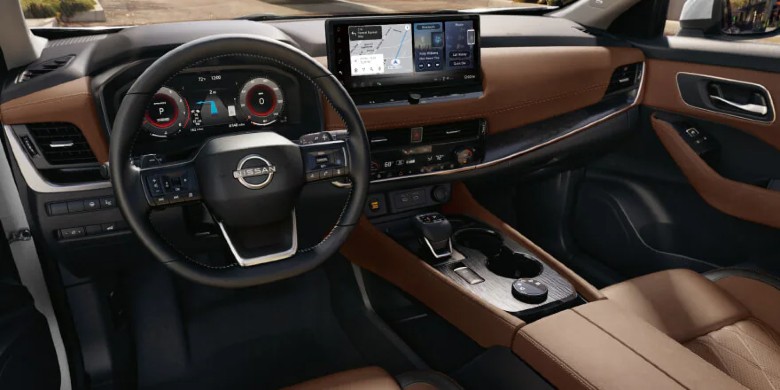
For navigation features, the system integrates with your vehicle’s built-in display and pulls live traffic data to suggest faster routes. If you’ve got a newer model with Google built in, you’re also getting access to Google Maps directly through the infotainment screen — no phone mount needed. The setup process for different Nissan Connect packages varies slightly, but the steps are straightforward: download the app, create an account, enter your VIN, and verify your vehicle. That’s it.
Nissan Connect Feature Comparison by Category
Here’s a quick look at what the platform covers and why each feature matters:
What Are the Nissan Connect Packages and How Do Subscriptions Work?
Nissan offers tiered Nissan Connect packages so drivers aren’t paying for features they’ll never use. The entry-level package covers the essentials — remote access, vehicle health alerts, and roadside assistance. Step up to the higher-tier packages, and you’re adding Wi-Fi hotspot capabilities, enhanced navigation, and family features like boundary and speed alerts.
Most new Nissans come with a complimentary trial period — typically a few months, depending on the model year and trim. After that trial, keeping those features active requires a Nissan Connect subscription. Pricing is generally offered on a monthly or annual basis, with annual plans working out to a better per-month rate. You can manage your subscription directly through the NissanConnect app or via the owner portal at NissanUSA.com.
The honest take? If you rely on remote start regularly, drive with teen drivers in the family, or just like knowing your car’s health without guessing, the subscription pays for itself quickly in peace of mind alone. But if you mostly use your phone for navigation and rarely need remote features, the free in-car tech like Apple CarPlay and Android Auto is still excellent on its own.
The Bottom Line: Is Nissan Connect Worth It?
For most drivers, the answer is a pretty easy yes. Nissan Connect turns your vehicle into a genuinely smart machine that works for you before you even get in. Whether it’s warming up on a frigid Greenfield morning, keeping tabs on a teenager behind the wheel, or just getting a heads-up when your oil’s due, these aren’t gimmicks — they’re features people actually use every day.
The beauty of the tiered Nissan Connect packages is that you’re not locked into a one-size-fits-all solution. Start with what you need, and add on if your situation changes. And if you’re not sure which setup makes the most sense for how you drive, the team at Gordie Boucher Nissan in Greenfield is happy to walk you through it without any pressure. It’s the kind of thing that’s easier to show than explain, and a quick demo in the showroom usually makes the decision pretty clear.
Explore Nissan Connect at Gordie Boucher Nissan
Ready to see it in action? Stop by Gordie Boucher Nissan in Greenfield, WI, and let one of the team members walk you through a live demo on any connected Nissan model. Whether you’re shopping for a new vehicle or just figuring out how to activate features on a Nissan you already own, they’ve got the answers. You can also browse the current inventory online to see which models come equipped with the latest NissanConnect technology.
Frequently Asked Questions About Nissan Connect
Most new Nissans include a complimentary trial of connected services. After the trial ends, continued use of remote features such as app control and vehicle health reports requires an active Nissan Connect subscription. In contrast, in-car features like Apple CarPlay work independently.
Some features — like in-car navigation, Apple CarPlay, and Android Auto — work without the app. However, remote features like locking doors, starting the engine, or locating your vehicle require the NissanConnect Services app on a compatible smartphone.
Most current Nissan models — including the Rogue, Sentra, Pathfinder, Frontier, and Altima — support NissanConnect Services. The level of features available can vary by model year and trim, so it’s worth confirming during the buying process.
Download the NissanConnect Services app, create an account, and register your vehicle using your VIN. The app will walk you through the activation step by step, and the whole process typically takes under ten minutes.
They’re different systems. Apple CarPlay mirrors your iPhone’s interface on the vehicle’s screen and is a standalone feature. At the same time, Nissan Connect is Nissan’s own cloud-based platform for remote access, vehicle monitoring, and connected services. Many Nissan models support both simultaneously.

0 comment(s) so far on What Is Nissan Connect?